

vscode + mcp: chat with your api using github copilot
tl;dr
In this article, you’ll learn how to:
- Build a FastAPI Books API
- Expose it with MCP
- Chat with it in VS Code using GitHub Copilot Agent Mode
- Bonus: Extend into AI-powered interactions with Ollama + OpenWebUI
introduction
Why would you ever want to chat with your API in VS Code using MCP?
Because you can! 💪😂
And honestly why not? The possibilities are endless.
This article walks you through setting up a simple REST API, publishing it with MCP, and using GitHub Copilot Chat in Agent Mode for interaction. And for those curious minds, there’s a bonus setup to push the boundaries even further.
what is mcp, and why use it?
What is MCP? It’s like the USB-C of AI — standardizing how apps connect to LLMs. Though sadly, it doesn't charge your laptop... yet.
Want the nerdy details? Dive into the official docs — they’re surprisingly readable.
setting up the environment
Let’s harness uv, the "Usain (V)Bolt of Python package managers", to set up your project. (Seriously, try install something. It's done before you finish typing).
initialize your project:
bashuv initadd dependencies:
bashuv add fastapi fastapi-mcp mcp pydantic requests uvicornconfigure your environment:
Create a
config.pyfile:pythonWEB_API_PORT = 5000 WEB_API_URL = f"http://localhost:{WEB_API_PORT}"
Optional: Your project tree might look like this:
📂 mcp-vscode-rest
├── .vscode/
│   └── mcp.json
├── books_server.py
├── mcp_books_server.py
└── config.py
Now your environment is ready to support the Books Management API and MCP integration!
building the books management api
Time to build a simple Books API using FastAPI.
endpoints:
/books(POST): Add a new book./books(GET): Retrieve all books./books/id/{book_id}(GET): Get details of a specific book by ID./books/id/{book_id}(DELETE): Remove a book by ID./books/search(GET): Search for books by author, title, or category.
key features:
- Validation with
pydanticmodels (Book,BookResponse). - In-memory storage for simplicity (
librarydictionary). - Error handling using
HTTPException.
- Validation with
Here’s an example of the add_book endpoint in the books_server.py file:
@app.post("/books", response_model=Dict[str, str], operation_id="add_book")
async def add_book(book: Book = Body(...)):
    if not book.title.strip() or not book.author.strip():
        raise HTTPException(
            status_code=400, detail="Title and author must be non-empty."
        )

    book_id = len(library) + 1
    library[book_id] = {
        "title": book.title.strip(),
        "author": book.author.strip(),
        "category": book.category.strip().lower() if book.category else None,
    }
    return {"message": f"Book added successfully with ID {book_id}"}
Full implementation: GitHub repo
publishing your FastAPI endpoints with MCP
FastAPI-MCP is a zero-configuration tool for automatically exposing FastAPI endpoints as Model Context Protocol (MCP) tools. With just a few lines of glue code, your FastAPI app gets MCP superpowers.
In mcp_books_server.py:
import config
from fastapi_mcp import FastApiMCP
from books_server import app
import uvicorn

BASE_URL = config.WEB_API_URL

mcp = FastApiMCP(
    app,
    name="Books Server",
    description="A simple book management server",
    base_url=BASE_URL,
    describe_all_responses=True,
    describe_full_response_schema=True,
)

mcp.mount()

if __name__ == "__main__":
    uvicorn.run(app, port=5000)
Your API is now discoverable and describable via MCP. No extra boilerplate needed.
Check out the FastAPI MCP GitHub repository for more details.
chatting with your api in VS Code
Ready to talk to your API like it’s ChatGPT? Let’s go.
1. configure MCP in VS Code
Create the .vscode/mcp.json file in your project folder to define the MCP server.
{
  "servers": {
    "mcp-books-server": {
      "type": "sse",
      "url": "http://localhost:5000/mcp"
    }
  }
}
This file tells VS Code where to find the MCP server and how to connect.
2. start the MCP server
uv run mcp_books_server.py3. use VS Code to interact with MCP
Open the .vscode/mcp.json file and click the Start link above the server config. Voila! You’re live.

4. test your api
Try out scenarios like:
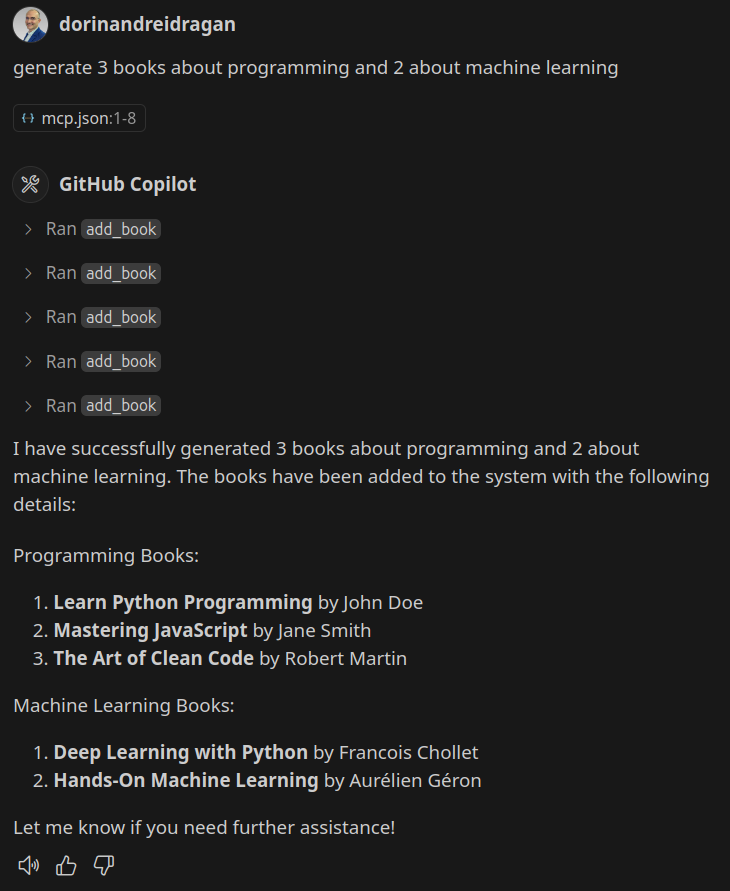
adding books: generate 3 books about programming and 2 about machine learning.
Do you see the beauty and potential of that?
searching by category: find the books in machine learning category.
This is awesome! (Of course not me in the profile picture below 🤓)
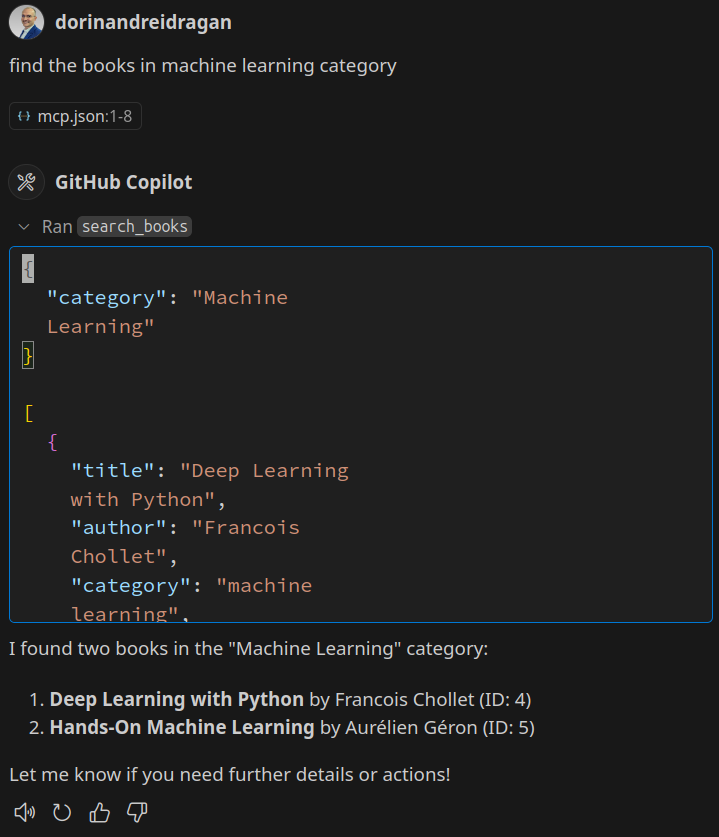
GitHub Copilot Chat will send real API calls and show you the responses inline. It’s like Postman with AI vibes.
bonus setup: ai-enhanced flow
Want to go next level?
Try chaining: FastAPI → MCP → Ollama → OpenWebUI
Now you’re building smart API agents that can learn from feedback, log context, and evolve with your product. More on that in an upcoming lightning post! So stay tuned!
heads-up: MCP's awesomeness (with quirks)
MCP is powerful — but sometimes it trips over its own genius. Ask it to juggle deletes and category filters and suddenly it's confused like when doing a rebase for the first time.
Stick with it, it's part of the future, and it's worth the ride. 🚀
your turn
Try it out, have fun, and let me know how it works for you.
Check out the full project on GitHub.